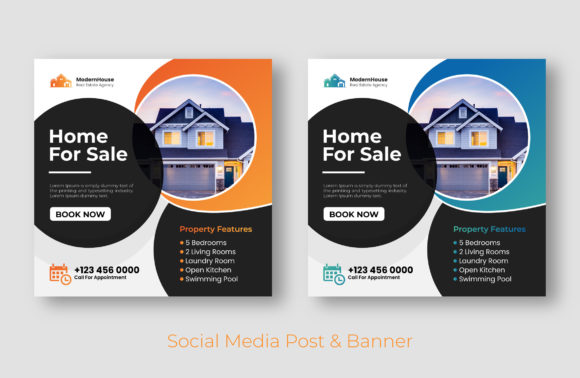
Real Estate Social Media Post Banner: Elevate Your Listings
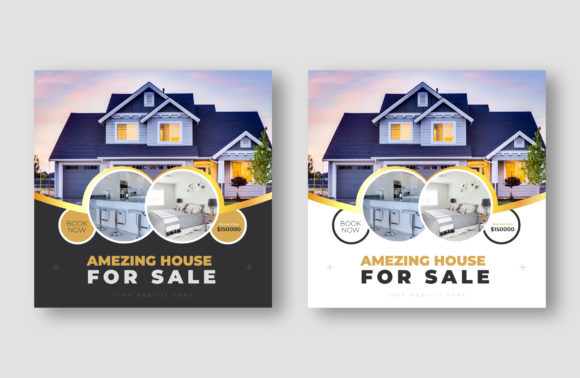
In the crowded digital marketplace of property sales, a generic photo rarely stops a scroll. A Real Estate Social Media Post Banner is more than just a background; it is a strategic design asset that frames your listing, establishes brand authority, and communicates value instantly. This specific template, sized perfectly at 1080x1080 pixels, offers a professional foundation for agents, agencies, and property managers who want to project high-end aesthetics without the high-end agency price tag. It serves as the visual handshake between your brand and a potential buyer’s first impression.
The Anatomy of the Template: Vector Precision and Visual Appeal
Unlike static raster images that pixelate when resized, this banner is delivered as a fully editable vector file in Illustrator EPS format. This distinction is crucial for maintaining professionalism across various mediums. The visual style leans toward modern typography and clean geometry, allowing the architecture of the property to breathe. It avoids the clutter of outdated real estate flyers, focusing instead on white space and strategic placement of text overlays.
The personality of this design asset is confident and adaptable. Whether you are marketing a downtown loft or a suburban family home, the structure supports high contrast and readability. The use of free fonts ensures that you can maintain brand consistency even if you need to generate text outside of the design software, making it a practical choice for small business owners who may not have access to expensive font libraries.
Strategic Applications for Marketers and Designers
While named for property, the utility of a Real Estate Social Media Post Banner extends to various sectors. For graphic designers and content creators, this template acts as a versatile container. It is ideal for:
- Instagram and Facebook Feeds: The 1080x1080 square format is the gold standard for mobile engagement, ensuring your post takes up maximum screen real estate without cropping issues.
- Digital Brochures: Import the vector into InDesign or Canva to create multi-page digital presentations for clients.
- Web Banners: With the EPS file, you can easily scale the elements for website headers or blog post featured images without losing quality.
- Print Collateral: Vectors are resolution-independent, meaning this same file can be scaled up for "Just Sold" postcards or yard signs.
For entrepreneurs in the staging or interior design industry, these banners provide a consistent frame for portfolio pieces. By adding your logo and adjusting the color palette to match your brand identity, you transform a generic template into a proprietary marketing tool.
Customization: The Power of the Vector File
The true value of this download lies in its editability. Receiving an Illustrator EPS file means you have access to every anchor point, color swatch, and layer. This is not just about swapping out a photo; it is about total control over the visual hierarchy.
When you open the file, you can deconstruct the layout. Perhaps the original design places the text in the bottom right, but your specific photo has a focal point there. In Adobe Illustrator, you can shift the text block to the top left, adjust the kerning of the display font, and alter the background opacity to ensure the text remains legible against a busy skyline. This level of customization is impossible with flattened JPG or PNG templates. You are essentially buying the blueprint, not just the house.
Typography and Readability Considerations
Effective social media graphics rely on the immediate legibility of text. A common mistake in real estate marketing is using overly decorative script fonts for property details, which often fails on mobile screens. This template likely utilizes a sans serif font or a clean serif font for the main details, ensuring that the price, address, and contact info are readable at a glance.
When customizing your Real Estate Social Media Post Banner, pay attention to font pairing. If the template uses a bold sans-serif for the headers, consider using a lightweight version of the same family for the body text to create contrast without visual conflict. Avoid adding too many new typefaces; stick to a maximum of two distinct styles to maintain a cohesive look. The goal is to guide the viewer's eye from the image to the offer, and finally to the call to action.
Practical Guide to Editing and Deployment
Getting started with this file requires minimal technical expertise, provided you have vector software like Adobe Illustrator or Affinity Designer. Here is a practical workflow for marketers and hobbyists:
- Brand Integration: Before adding property details, place your agency logo. Adjust the template's accent colors to match your brand's hex codes. This ensures that even if the listing changes, your brand remains the constant visual anchor.
- Imagery Selection: Choose high-resolution photos. Because the banner is 1080px wide, your source image should be at least that size to avoid blur. Pay attention to the negative space in your photo to ensure the template text does not cover critical architectural features.
- Content Hierarchy: Use the strongest visual weight for the most important information. Usually, this is the "For Sale" status or the price. Secondary info, like the square footage or number of beds, can be smaller.
- Export Settings: When saving for social media, export as a PNG for the sharpest text edges. If you are using this for a web design element, an SVG might be more appropriate for faster load times.
Remember that the mockup images provided in the store preview are for demonstration only. The value lies in the editable structure you receive, which allows you to create an infinite number of variations from a single purchase. This efficiency is a game-changer for busy agencies managing multiple listings simultaneously.
Ensuring Brand Consistency Across Campaigns
A strong brand identity in real estate is built on recognition. When a potential client sees your posts, they should know it is you before they even read the text. By using a standardized Real Estate Social Media Post Banner for all your listings, you create a visual rhythm on your profile grid.
This consistency signals reliability. It tells the client that you are organized, detail-oriented, and professional. Whether you are a solo realtor